![WhatSender [Official] | Free Bulk WhatsApp Sender | WhatSender.net](https://www.whatsender.net/wp-content/uploads/2020/09/photo_2020-09-02_17-47-4844444444.png)

WhatSender Pro EXTENSION
Professional WhatsApp Web Automation Tool
What is WhatSender Pro?
WhatSender Pro 4.0 is a powerful Chrome extension that works on any computer (Windows, macOS, and Linux) without downloading any software. Just install the extension on Google Chrome and you can send bulk WhatsApp messages, manage contacts, and automate your WhatsApp Web experience.
✨ New Features in Version 4.0
📱 5 Powerful Tabs
- Single Message
- Bulk Message
- Contacts Manager
- Groups Manager
- Settings & License
👥 Contact Management
- Auto-load from WhatsApp Web
- Search and filter contacts
- Select multiple contacts
- Export to CSV
📨 Smart Messaging
- Send with attachments (images/PDF)
- Custom variables (@valueOne, @valueTwo)
- Adjustable delay between messages
- Progress tracking
🎨 Enhanced UI
- Modern gradient design
- Light/Dark theme toggle
- Statistics dashboard
- Responsive layout
📚 Quick Navigation
1️⃣ How to Install WhatSender Pro
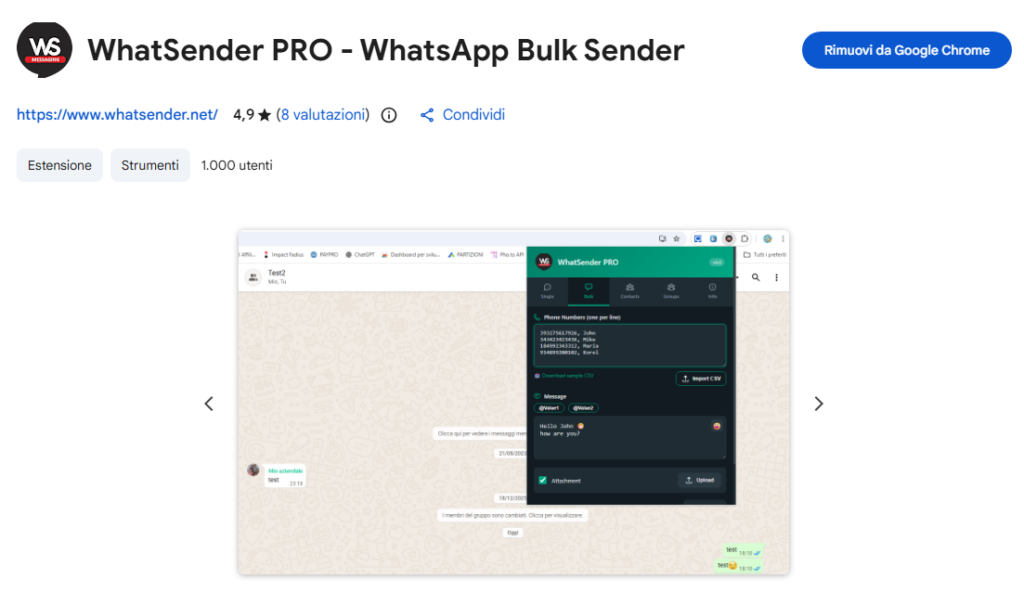
STEP 1: Install from Chrome Web Store
Access the Chrome Web Store and click Add to Chrome to install the extension.
STEP 2: Connect to WhatsApp Web
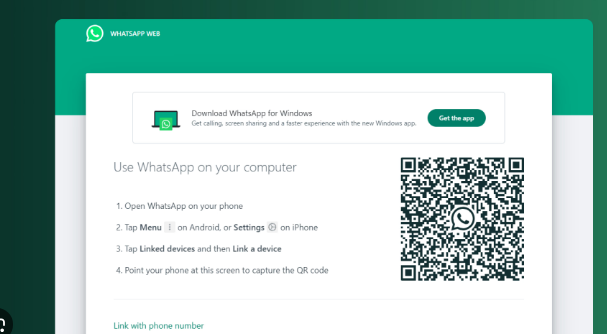
After installation, the extension will automatically open WhatsApp Web. You need to scan the QR code to connect your WhatsApp account.
How to scan QR code:
- Android: Open WhatsApp → Menu (⋮) → Linked Devices → Link a Device
- iPhone: Open WhatsApp → Settings → Linked Devices → Link a Device
- Windows Phone: Open WhatsApp → Menu → WhatsApp Web
STEP 3: Open the Extension
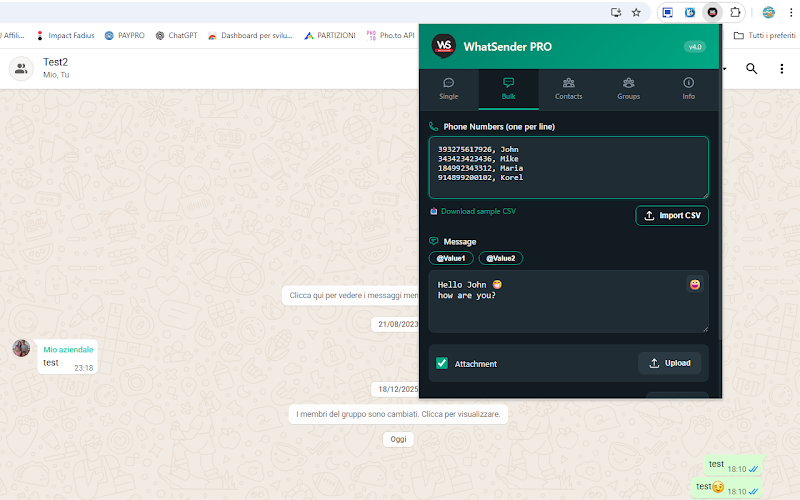
After scanning the QR code, click on the WhatSender Pro icon in your Chrome toolbar to open the extension popup. You’ll see the main interface with 5 tabs.
2️⃣ Send Single Messages
From the Single Message tab, you can send individual messages to any phone number (even if not saved in your contacts).
📝 How to Send:
- Enter Phone Number: Type the recipient’s phone number with country code (e.g., +1234567890)
- Write Your Message: Type your message in the text area (max 4096 characters)
- Optional – Add Attachment: Check “Attach Image/File” and upload a file (JPG, PNG, or PDF)
- Click Send: Press the “Send Message” button
💡 Pro Tip: Select from Contacts
Click “Select from Contacts” button to quickly choose a contact from your WhatsApp contact list without typing the number manually.
✍️ Text Formatting:
You can format your messages using WhatsApp formatting syntax:
- Bold: *your text* → your text
- Italic: _your text_ → your text
- Strikethrough: ~your text~ →
your text - Monospace: “`your text“` →
your text
3️⃣ Send Bulk Messages
From the Bulk Message tab, you can send the same message to multiple recipients at once. Perfect for announcements, promotions, or notifications.
📋 How to Send Bulk Messages:
- Add Phone Numbers: Enter one phone number per line (with country code)
- Or Upload CSV: Click “Upload CSV” to import numbers from a file
- Or Load from Contacts: Click “Load from Contacts” to select saved contacts
- Write Message: Type your message (you can use variables)
- Set Delay: Adjust delay between messages (default: 4000ms = 4 seconds)
- Optional – Add Attachment: Check the box and upload a file
- Click Send: Press “Send Bulk Messages” button
🎯 Using Variables for Personalization:
You can personalize each message using @valueOne and @valueTwo variables. This makes your messages more personal and reduces ban risk.
CSV Format Example:
+1234567890,John,Premium
+9876543210,Mary,Standard
+5555555555,David,VIP
Message Example:
Hello @valueOne! 👋
Your account type is: @valueTwo
Thank you for being with us!
Result for first recipient:
Hello John! 👋
Your account type is: Premium
Thank you for being with us!
⚠️ Important: The first 5 bulk campaigns are FREE. After that, you need to activate the PRO license. See the License Activation section below.
📊 Progress Tracking:
While sending bulk messages, you’ll see a progress bar showing:
- Current message being sent (e.g., “Sending: 5 / 20”)
- Percentage completion
- Visual progress bar
4️⃣ Manage Contacts
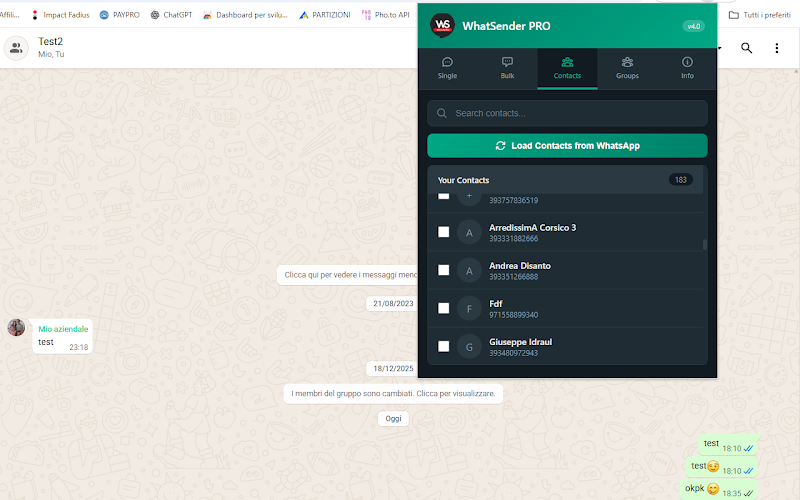
The Contacts tab allows you to automatically load and manage all your WhatsApp contacts directly from WhatsApp Web.
👥 Contact Management Features:
- Auto-Load Contacts: Click “Load from WhatsApp” to automatically import all contacts
- Search: Use the search bar to filter contacts by name or phone number
- Select Multiple: Check individual contacts or use “Select All” button
- Export to CSV: Export selected contacts to a CSV file for backup or external use
- Use in Messages: After selecting contacts, use them in Single or Bulk Message tabs
💡 Pro Tip: Keep Your Contact List Updated
Click “Load from WhatsApp” regularly to keep your contact list synchronized with your WhatsApp account. The extension shows both contact names and phone numbers.
📈 Statistics Display:
At the top of the Contacts tab, you’ll see:
- Total Contacts: Total number of contacts loaded
- Selected: Number of contacts currently selected
5️⃣ Send to Groups
The Groups tab allows you to send messages to multiple WhatsApp groups at once. Perfect for community announcements or team updates.
👨👩👧👦 How to Send to Groups:
- Load Groups: Click “Load Groups” to automatically import all your WhatsApp groups
- Search: Use the search bar to find specific groups
- Select Groups: Check the groups you want to send messages to
- Write Message: Type your message in the text area
- Send: Click “Send to Selected Groups” button
⚠️ Note: Make sure you are an admin or have permission to send messages in the selected groups. Messages are sent with a 2-second delay between each group.
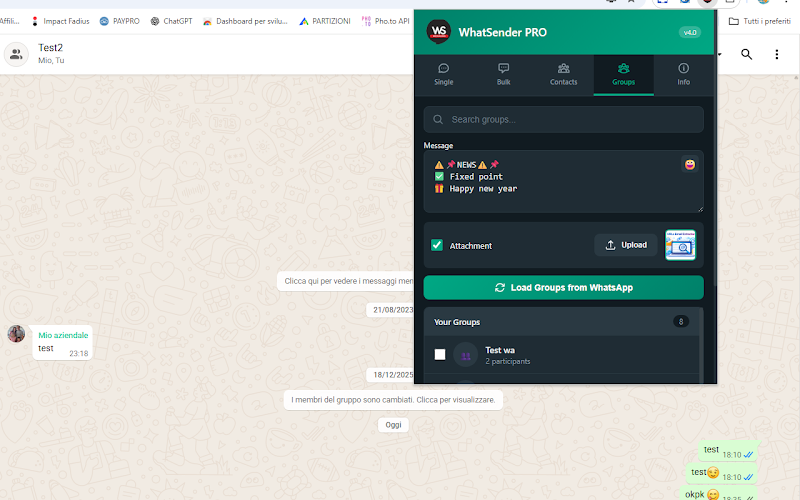
📊 Group Information:
For each group, the extension displays:
- Group Name: The name of the WhatsApp group
- Member Count: Number of participants in the group
- Group Avatar: Initial letters of the group name
6️⃣ Activate PRO License
🚀 Upgrade to PRO
Get unlimited messaging capabilities!
FREE Version: 5 bulk campaigns
↓
PRO Version: Unlimited campaigns
🔑 How to Activate:
- Open the Settings tab in the extension
- Look for the “License Activation” section
- Enter your activation code in the input field
- Click “Activate License” button
- You’ll see a success message: “License activated successfully!”
✅ What You Get with PRO:
- ✅ Unlimited bulk message campaigns
- ✅ Send to unlimited contacts
- ✅ Send to multiple groups
- ✅ All features unlocked
- ✅ Priority support
- ✅ Free updates for 1 year
💰 Price: One-time payment for 1-year license. After purchase, you’ll receive the activation code via email within minutes.
7️⃣ Tips to Reduce Ban Risk
⚠️ Important: Avoid WhatsApp Ban
WhatsApp actively monitors for spam behavior. Follow these guidelines to keep your account safe:
✅ DO’s
- Send to people who expect your messages
- Use a business number, not personal
- Keep messages personalized with variables
- Set delay to at least 4-6 seconds
- Verify numbers are valid before sending
- Start with small batches (20-30 messages)
❌ DON’Ts
- Don’t send to random numbers
- Don’t send the same message to everyone
- Don’t send more than 50 messages at once
- Don’t send more than 500 per day
- Don’t use spammy keywords
- Don’t ignore user complaints
📋 Best Practices Checklist:
| Action | Recommended |
|---|---|
| Messages per batch | 20-50 |
| Messages per day (total) | Max 500 |
| Delay between messages | 4-8 seconds |
| Use personalization variables | ✅ Always |
| Test with small batch first | ✅ Recommended |
⚖️ Disclaimer:
This tool is designed for legitimate business communication with people who expect to receive your messages (customers, students, patients, team members, etc.). It is NOT a spam tool. We are not responsible for any WhatsApp account bans resulting from misuse of this extension. Use responsibly and follow WhatsApp’s Terms of Service.
✨ Additional Features
🎨 Dark/Light Theme
Toggle between light and dark themes for comfortable viewing in any lighting condition. Look for the theme toggle button in the header.
📊 Statistics Dashboard
Track your messaging activity with real-time statistics showing total messages sent, contacts loaded, and groups available.
💾 Auto-Save Data
Your messages, phone numbers, and settings are automatically saved. Close the extension and come back anytime – your data is preserved.
📱 Character Counter
Real-time character count helps you keep messages within WhatsApp’s limits and optimize your message length.
WhatSender Pro 4.0
Professional WhatsApp Web Automation Tool
This extension is not endorsed or certified by WhatsApp Inc. This is an unofficial enhancement for WhatsApp Web.
© 2026 WhatSender. All rights reserved. | Privacy Policy | Terms of Service